
First flight
Everything you need for your first hour: which banner to fly for, how to fly and fight, what your screen is telling you, and what happens when things go wrong.
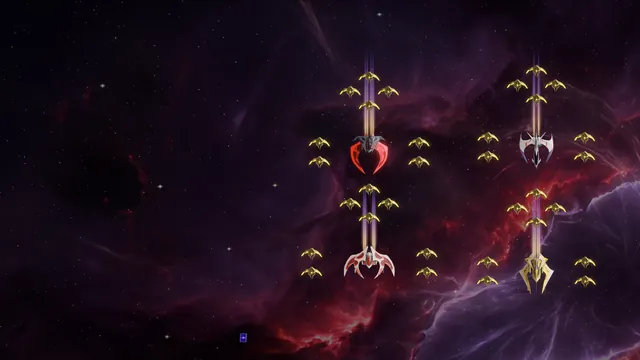
When you create your pilot you choose a nickname and a faction. The three factions fly the same ships, the same gear and the same progression: your faction sets your home maps, your crest and your side in a fight, never your power.

 WARDENSW-1 WARDENS ANCHORAGE
The disciplined order of the inner colonies, sworn to hold the line. Red and orange.

 SALVAGERSS-1 SALVAGE REACH
Independent scrappers of the outer belt, rich in what others leave behind. Amber and gold.

 MYSTICSM-1 VEILGATE
Believers out on the deep Rift fringe, certain the Rift is calling them. Violet.
Fly with your friends
Pilots of the same faction never fight each other. Pick the same banner as the people you want to fly with, and the same world: each world is separate, and a pilot never moves between them.
You can change faction later from Settings: it costs 10,000 Rift Crystal and half your Honor, works once every 30 days and not while you are in a clan, and moves you to your new faction’s base. You keep your ships, your gear and your Rank Points. A new nickname costs 500 Rift Crystal, once every 24 h.
Hold to fly, click to lock, one key to fire. Press F1 in the game for the full list; most keys can be changed in Settings, under Controls.
- Hold left-click
- Steer: your ship flies toward the cursor. Let go and it flies on to that point and stops. Every ship has one fixed speed, with no boost.
- Click an enemy
- Lock it as your target. You can lock only a ship you can see.
- Right-click
- Clear your target.
- CtrlCmd
- Start firing at your locked target, and press again to stop. Double-clicking your locked target opens fire too.
- 1 to 0
- Use the dock slot under that key: an Energy Cell, a rocket, a tech extra or an ability.
- Space
- Fire a rocket now. Your loaded rocket also fires on its own while your guns are firing.
- V
- Vent your Heat early.
- Q
- Unleash Overdrive.
- J
- Jump through the portal you are sitting on.
- C
- Swap between Config 1 and Config 2.
- R
- Switch the dock between slot set A and B.
- Tab
- Open the menu: Hangar, Shop, missions, clan and settings.
- Alt1 to 5
- Open or close the panels: Squad, Missions, Chat, Map, Cargo.
- Enter
- Chat.
- Mouse wheel
- Zoom: below 100% ships and pickups shrink, above it the camera moves in.
- F8
- Report a bug, with a picture of your screen.
Let the ship do the walking
Click a spot on the Map panel and your ship sets a course there. Click a far crate and it flies over and collects it. New pilots also get short control tips on screen during their first flights.
iPhone and Android play the full game with controls made for touch.
- Move stickPut your thumb down in the stick’s zone and steer. A short tap in the world locks a ship or collects a pickup, so a second finger can lock while the first one steers.
- Fire keyTap to start or stop firing; with nothing locked it picks the nearest target in view. Drag off the key to aim a lock, and let go to lock and fire.
- Keys round itYour cells, rockets and tech ring the fire key, with the side keys, the two slot sets, a config key and a Jump key for portals.
- Radar and panelsA round radar with keys for the galaxy map, squad, missions, chat and cargo. On the map, tap where you want to fly.
- Your own layoutSettings, Controls, Edit HUD: move and resize every key, pick the stick’s zone, mirror it all for the other hand, and keep three layouts.
- TipsPress and hold an item to read what it does.
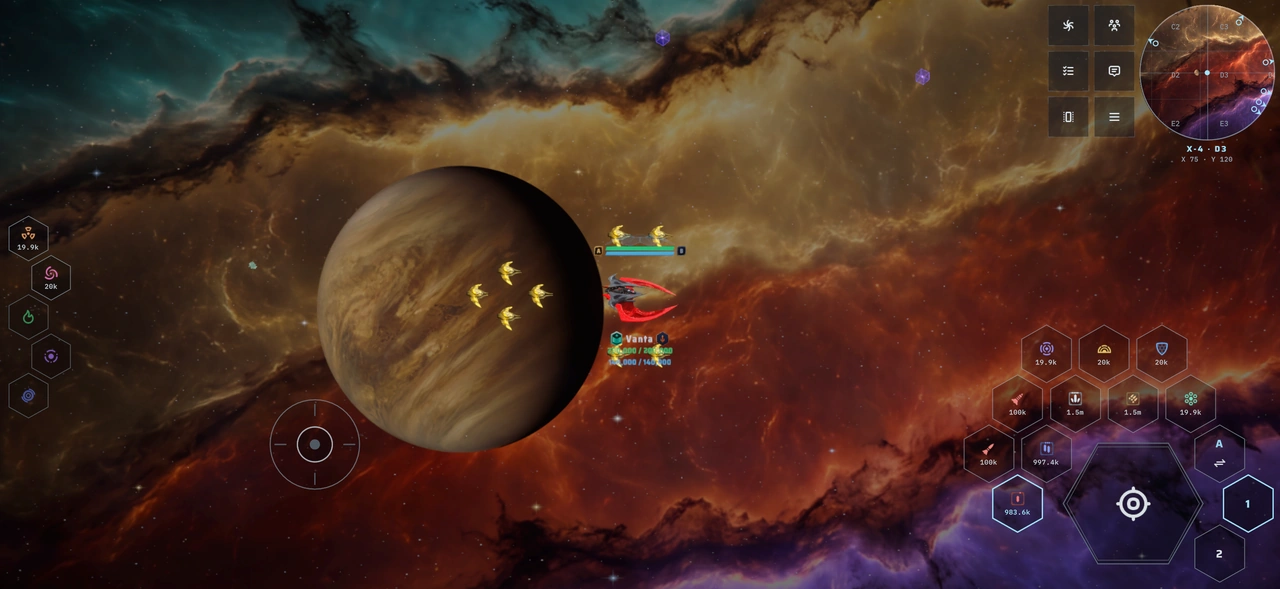
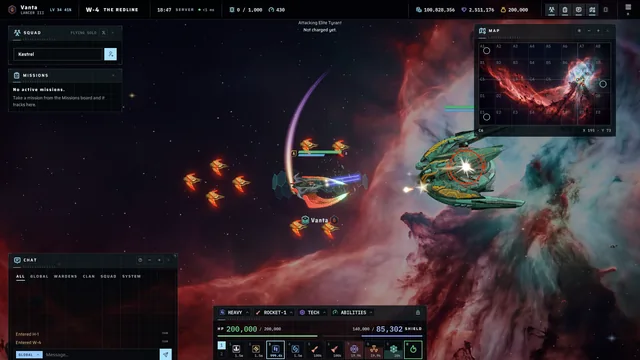
- The top barYour Credits, Rift Crystal and Gold, your ping, how full your hold is, your speed, which config you fly, and the panel and menu keys.
- The dockYour Energy Cells, rockets, tech and ship abilities, with the Heat and Overdrive meters. Hold the lock to rearrange it.
- Map panelThe radar: portals, stations, safe zones, contacts and your squad, with a readout like W-5 · B4.
- PanelsSquad, Missions, Chat, Map and Cargo. Move them where you like.
- Over your shipYour HP and shield bars, your drones, and under the hull your nickname, rank badge, clan tag and crest.
- At the topWhat just happened: rewards, kills and warnings. Entering a map shows its name and whether pilots can fight there.
- Your lockRed on an enemy, blue on a friend, grey when another pilot already owns the kill and it will not pay you.
The menu opens on Command: what is waiting for you, your flight report and log, and who is online. Settings has a switch for most of what the HUD shows, from damage numbers and the radar grid to the clock and the UI scale.
You start at your faction’s base, the first map of your band: W-1 Wardens Anchorage, S-1 Salvage Reach or M-1 Veilgate. Your eighth map holds your second home station: Redwatch Bastion, Scrapfall Yard or Silent Sanctum.
- A station is a safe zone: fly into it, there is no docking screen. Inside, neither pilots nor aliens can damage you.
- Your two home stations are the only places that buy the resources you haul. The Concord’s station shelters you but buys nothing.
- The Hangar, the Shop, missions, the Auction and your clan open from the menu wherever you are.
- Arriving through a portal is safe on every map except the contested ones (X-1 to X-4).
- Past a map’s border is the radiation belt. It hurts, and it stops your repair bot.
Your shield takes its share of every hit first, then your HP takes the rest. The shield refills by itself, 4% a second once you have gone 8 s without taking damage. Your HP is mended only by your repair bot: every new ship comes with the free Nanite Patch, and a better bot mends faster (the bots). It starts 5 s after your last shot or hit, whether you fly or sit still.
No bot, no repairs
A ship with no repair bot fitted never mends its own HP, and the Hangar warns you about it. A bot mends only the ship you are flying, never a parked one.
When your ship is destroyed, 20% of your hold drops as a crate that anyone can scoop. You never lose your gear, your ships, your experience or your currencies. Your ship becomes a wreck: repair it at the station for Rift Crystal (always free for the NOVA-α; every hull’s price is on its card), or open the Hangar and fly another ship. A repaired wreck launches with 10% of its HP, and your bot does the rest.
Fall on your upper home maps and you wake at your second home; anywhere else, at your base. There is no respawn timer.
Every new pilot launches with the same kit:
- NOVA-α
- Spark
- SG-1
- Nanite Patch
- 1,000 × Lite
- 20 × Rocket-1
- 50,000 Credits
- 01Follow the starter missionsThey walk you through your first kills, pickups and sales, and pay well. See missions.
- 02Fit better gearYour Credits go furthest on lasers and shield generators. See equipment.
- 03Buy your first fighterThe Wasp is the first ship you buy. See the ladder.
- 04Find a squad and a clanEverything is better in a fleet. See clans.
Stay active
With no input for a long stretch you get a 60 s countdown in chat, then you are signed out. Only your own actions count, such as flying somewhere, firing, jumping or chatting.